
PROJECT OVERVIEW
TOYOTA Cargo Dashboard Redesign
UX/UI Redesign for Driver Productivity and Safety

New cargo scale feature integrated into the dashboard interface.
Overview
Redesigning a Toyota cargo truck dashboard to introduce new functionality that improves safety, efficiency, and usability for labor-focused driving environments.
Through observation of welders and cargo drivers, I identified unmet needs related to material weighing, fatigue during long drives, and fragmented access to essential information. The redesigned dashboard introduces integrated cargo weight monitoring, meeting and weather visibility, and comfort-focused features to support safer and more efficient daily workflows.
Result
Designed a clearer information hierarchy and simplified navigation to support faster and safer driver interaction.
Role
UX/UI Designer
Tools
– Figma
– Illustrator
– Photoshop
Skills Applied
UX Research:
UX audit, usability evaluation, persona development, task flow analysis
Interaction Design:
Information architecture, user flows, interaction patterns
UI Design:
Wireframing, visual hierarchy, scalable design systems
Prototyping:
Interactive prototyping, workflow validation
Scope
UX audit, Interaction design, Information architecture, design system development
Timeline
4–week conceptual design sprint
Problem Statement:
Cargo truck drivers rely heavily on their vehicles to transport materials, manage schedules, and travel long distances to job sites. However, existing dashboard systems lack integrated tools for cargo weight monitoring, centralized task visibility, and support for driver well-being. Drivers often depend on external tools to weigh materials, check schedules, and monitor destination conditions, increasing cognitive load and reducing workflow efficiency.
Additionally, prolonged driving without ergonomic support can lead to fatigue, negatively affecting safety, comfort, and overall productivity.
Goal:
Design an enhanced in-vehicle dashboard interface that improves workflow efficiency, safety, and driver experience by integrating cargo weight monitoring, centralized scheduling, and contextual driving information into a low-distraction interface optimized for labor-focused environments.
Solution:
Within a 2-week conceptual design sprint, I redesigned the Toyota cargo dashboard to introduce new functional capabilities informed by observed labor workflows and unmet user needs.
Key design innovations included:
– Integrated cargo scale enabling real-time materials weight monitoring directly from the vehicle
– Centralized dashboard displaying daily schedule, communication access, and destination weather
– Improved information hierarchy to reduce cognitive load and improve task clarity
– Conceptual seat comfort control to support the driver's well-being during long-distance driving
– Scalable, modular UI system optimized for real-world driving environments
The dashboard connects with the driver’s mobile device to surface scheduling and communication information while maintaining focus on safe vehicle operation.
Outcome:
The redesigned dashboard expands the vehicle’s role from transportation to an integrated productivity, safety, and workflow management tool tailored for labor-focused users
– Introduced an integrated cargo scale enabling real-time material weight monitoring
– Improved task visibility through centralized scheduling, weather, and communication tools
– Reduced cognitive load through clearer information hierarchy and simplified navigation
– Reduced navigation complexity by consolidating key functions into a unified interface
– Established a scaleable conceptual UI system with real-world labor workflows
Design context
Cargo truck drivers depend on dashboard interfaces to coordinate navigation, communication, and job-site tasks under physically and cognitively demanding conditions. However, existing systems often fragment critical information across multiple tools, increasing cognitive load and reducing operational efficiency.
This project redesigns the in-vehicle dashboard using human-centered design and information architecture principles to centralize essential functions, improve information clarity, and enable safer, more efficient driver workflows.


FEATURES
OPPORTUNITIES
The redesigned touchscreen interface centralizes essential tools to support driver workflow efficiency and reduce cognitive load.
Calendar Integration:
Syncs with the driver’s calendar to provide real-time reminders and scheduling visibility, reducing reliance on external devices.
Cargo Scale Integration
Displays real-time cargo weight measurements directly within the dashboard, improving safety and operational accuracy.
Seat Comfort Controls:
Provides accessible controls for seat massage and comfort adjustments, supporting driver well-being during extended driving sessions.
SAFTY CONSIDERATIONS
-
Implements voice-controlled interaction to reduce manual input and support hands-free operation, minimizing driver distraction and cognitive load.
-
Prioritizes essential information and simplifies interface interactions to maintain driver focus and support safer vehicle operation.
PERSONAS
This dashboard concept was designed with real users in mind—like Jake, a metal fabrication business owner who spends long hours driving to job sites and needs quick access to his schedule, real-time weather updates, and hands-free communication. To improve comfort, Jake also benefits from integrated massage seat controls and a built-in cargo scale for accurate product measurements.
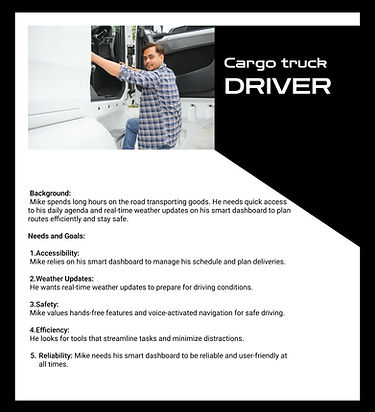
Similarly, Mike, a long-haul driver transporting goods, relies on a reliable, distraction-free dashboard that helps him plan routes efficiently, stay updated on weather conditions, and navigate safely using voice commands. Both users prioritize efficiency, comfort, and safety, which form the foundation of this intuitive dashboard experience.

Primary Persona:
Jake — Metal
Fabrication Business Owner
Represents independent contractors who require efficient task coordination, cargo measurement, and hands-free interaction to support productivity and safety during demanding workdays.
Secondary Persona:
Mike — Long-Haul
Cargo Driver
Represents professional drivers who rely on reliable navigation, real-time information access, and low-distraction interfaces to ensure safe and efficient transportation.
STYLE TILES
-
Represents professional drivers who rely on reliable navigation, real-time information access, and low-distraction interfaces to ensure safe and efficient transportation.
-
A neutral palette of black, tan, and white was selected to create a calm, professional interface while ensuring strong contrast for readability in varying lighting conditions.
-
Typography follows a structured hierarchy (H1–H4) to guide attention, improve scannability, and enable quick decision-making during time-sensitive tasks.
-
Custom iconography was designed with simple, recognizable forms to support rapid identification and minimize driver distraction.
-
Supporting visual elements—including vehicle schematics and contextual imagery—reinforce system feedback and improve spatial awareness for cargo management and vehicle interaction.
These style tiles established the visual foundation for a scalable dashboard design system and ensured consistent interaction patterns across all features.

Style tile defining typography, iconography, imagery, and color system used to support clear, distraction-free driver interaction.
USER FLOW
The Toyota Cargo Truck dashboard begins with a clean startup screen that transitions into a centralized, low-distraction interface designed specifically for labor drivers such as welders and construction professionals. The Home screen serves as a command center, providing quick access to meetings, communication, navigation, and essential driving information. Real-time weather updates support job-site condition preparation, while integrated features, such as the cargo weight scale, enhance transport safety and operational efficiency. Comfort features, including the massage seat option available when parked, promote driver well-being. This user flow prioritizes clarity, efficiency, and safety, enabling drivers to remain focused, informed, and productive throughout their workday.

System architecture illustrating how drivers interact with dashboard modules including navigation, vehicle monitoring, communication, and comfort controls.
ATOMS, MOLECULES, AND ORGANISMS
The interface was developed using atomic design principles to ensure consistency, scalability, and efficient implementation across the dashboard. Foundational UI elements (atoms) were combined into functional components (molecules) and structured into complete interface sections (organisms). This system enables clear visual hierarchy, predictable interaction patterns, and a cohesive, scalable user experience.

Atomic elements, including typography, color tokens, icons, and control primitives, form the dashboard’s foundational UI system.

Functional components combine atomic elements into interactive modules such as navigation controls, communication panels, and media widgets.

Complete interface sections integrating multiple components into structured layouts that support real-world driver workflows.
WIREFRAME/ (MID TO HIGH FIDELITY)
These wireframes establish the dashboard’s structural foundation using human-centered design principles. Layout hierarchy prioritizes high-frequency driver tasks such as navigation, scheduling, weather awareness, and cargo weight monitoring. This stage validates information architecture, interaction flow, and cognitive load reduction before applying final visual design, ensuring safety, clarity, and operational efficiency.
MID FIDELITY
PROTOTYPE

Mid-fidelity prototype validating layout hierarchy, startup flow, and driver orientation before high-fidelity visual refinement.
WIREFRAME
Dashboard Overview


Dashboard Overview
Meetings
Weather
Navigation
Communication
Wireframe exploration of the Home interface, designed as a centralized command center providing quick access to meetings, navigation, weather, and communication tools, supporting efficient planning and reduced cognitive load while driving.
WIREFRAME
Vehicle Status Interface



Vehicle Status
Vehicle Sensors
Cargo Load
Tilt & Balance
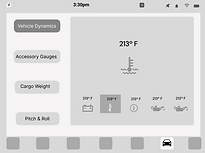
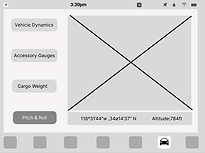
Wireframe exploration of the Vehicle Status interface, highlighting the cargo weight feature as a key solution for improving load visibility, operational awareness, and driver safety.
Seat Features
WIREFRAME
Driver Comfort System

Comfort
Massage
Climate


Vehicle Status
Interface
Driver Comfort System
Wireframe exploration of the Driver Comfort System, enabling intuitive adjustment of seat position, massage, and climate settings to enhance ergonomic comfort and reduce physical fatigue during extended driving sessions.
WIREFRAME
Navigation Interface



Car Navigation
Interface
Map
Search
Go
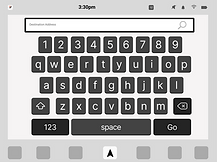
Wireframe exploration of the Car Navigation interface, enabling drivers to search destinations, visualize routes, and receive real-time guidance through a clear, distraction-minimized layout.
WIREFRAME
Media and Audio System


Media & Audio System
Radio
Phone
Streaming
Bluetooth
Wireframe exploration of the Media and Audio System, enabling drivers to access radio, phone media, streaming services, and Bluetooth audio through a unified interface designed for minimal distraction and seamless in-vehicle interaction.
WIREFRAME
Mobile Companion Interface


Mobile Companion Interface
Contact
Calls
Messeges
Wireframe exploration of the Mobile Companion Interface, extending vehicle interaction beyond the dashboard by enabling access to contacts, communication history, and system continuity between mobile and in-vehicle environments.
HIGH FIDELITY
PROTOTYPE
High-fidelity prototype demonstrating the complete Toyota cargo dashboard interface, validating interaction flow, visual hierarchy, and real-time driver support. This stage illustrates final UI behavior across navigation, scheduling, and vehicle monitoring features.
Prototype Interaction Flow


Dashboard Overview

Home dashboard integrating navigation, weather, and meeting overview for real-time driver awareness.
Dashboard Subsystems Monitoring


Destination weather view provides real-time environmental awareness to support informed driving decisions.
Today’s meetings view enabling quick access to schedule and location details for efficient trip planning.
Vehicle Monitoring System

Vehicle monitoring interface providing real-time visibility into cargo load, vehicle dynamics, accessory systems, and vehicle orientation, enabling safe, informed, and efficient driving decisions.
Subsystem Interfaces
Detailed functional views


Displays real-time status of steering, drivetrain, and mechanical systems to support vehicle safety and diagnostics.
Provides real-time performance metrics for vehicle systems and accessories.
Shows cargo load and distribution for safe transport management.
Visualizes vehicle orientation to support terrain awareness and stability.


Driver Comfort System
The driver comfort system provides real-time control over seat positioning, massage modes, and climate settings to support ergonomic health during extended driving periods. The interface prioritizes accessibility and safety by enabling quick adjustments with minimal cognitive load.
Subsystem Interfaces
Detailed functional views
Provides intuitive seat position adjustment with visual feedback to support ergonomic posture and reduce physical strain.
Allows independent seat climate adjustment to maintain optimal thermal comfort in varying environmental conditions.
Displays available massage programs with safety-aware activation to minimize distraction during vehicle operation.

Offers selectable massage modes to improve circulation and reduce fatigue during extended driving periods.
Car Navigation Interface
The navigation system enables real-time destination search, route visualization, and turn-by-turn guidance to support safe and efficient driving. The interface prioritizes clarity, speed awareness, and distraction-aware interaction for improved situational awareness.

Allows drivers to quickly enter destinations using an optimized on-screen keyboard designed for clarity, accuracy, and ease of interaction.

Displays real-time route guidance, speed awareness, and directional prompts to help drivers navigate safely and efficiently.
Media and Audio System
Media interface enabling seamless control of radio, streaming, and Bluetooth audio with intuitive playback and source selection for a safe and uninterrupted driving experience.

Centralized media hub allowing drivers to manage audio sources, playback, and connectivity with minimal distraction.
Mobile Companion Interface

The mobile companion interface extends vehicle functionality by enabling seamless access to recent calls, contacts, and messaging features. The system supports uninterrupted communication while prioritizing driver safety, focus, and minimal distraction through a clear and accessible dashboard layout.

Displays recent call history, allowing drivers to quickly review and reconnect with contacts while maintaining attention on the road.
Subsystem Interfaces
Detailed functional views

Enables drivers to search and access contacts using an optimized on-screen keyboard designed for fast, accurate, and distraction-aware interaction.

Provides access to messaging features with clear system feedback and safety-focused interaction to minimize cognitive load during vehicle operation.

Displays active call status and essential call controls, supporting hands-free communication while preserving driver safety and focus.
All interactions were designed to minimize driver distraction through simplified layouts, large touch targets, and park-mode safety restrictions for non-essential features such as messaging and massage controls. These decisions prioritize driver focus, cognitive clarity, and safe vehicle operation.
PROTOTYPE OVERVIEW
This high-fidelity prototype demonstrates the complete dashboard experience designed to support labor drivers through safe, efficient, and distraction-aware interactions.
Prototype Demonstration

Prototype demonstrating real-time dashboard interaction, communication access, and driver-focused safety features.
-
Designed for labor drivers (e.g., welders, construction workers)
-
Uses a clean layout to reduce cognitive load and distraction
-
Displays daily schedule for efficient job planning
-
Enables one-tap access to calls and navigation for fast interaction
-
Shows current and destination weather for job-site preparation
-
Includes a cargo scale feature to improve safety
-
Offers a massage seat option available only in parking mode
-
Prioritizes usability, efficiency, and driver well-being