
SAVANT
Smart Dining Table Interface
A UX case study exploring how integrated environmental and media controls can be unified within a single touchscreen system.

Project Type
UX/UI Interaction Design Concept – Smart Environmental interface
Skills Applied
-
User Research
-
Systems Thinking
-
Interaction Design
-
Wire-framing & Prototyping
-
UI System & Visual Identity
-
Atomic Design Principles
-
Documentation & Presentation
Tools
– Figma
– Illustrator
– Photoshop
Time
4 weeks
Goal
Design a tablet-based smart dining system that integrates environmental control, media access, and home connectivity into a seamless and accessible interaction experience.
into a seamless and accessible interaction experience that reduces environmental friction during shared dining activities.
DESIGN RATIONALE
This architecture centralizes environmental interaction into a single control surface, reducing cognitive load and interaction fragmentation across distributed home systems.
SYSTEM ARCHITECTURE
User Interface layer Environmental Systems (Lighting, Temperature, Media)
Multi-device interaction ecosystem

PROBLEM STATEMENTS
Users must manage food temperature, media, and home controls across fragmented systems, increasing cognitive load and disrupting shared dining experiences.
HYPOTHESIS STATEMENTS
If environmental and dining-related controls are centralized into a single touchscreen interface, users will experience reduced cognitive load and smoother mealtime coordination, because interaction fragmentation across distributed systems is minimized.
PROPOSED EVALUATION FRAMEWORK
If developed into a functional prototype, evaluation would include:
-
Perceived cognitive load (NASA-TLX)
-
Task-switch frequency during shared meals
-
Time-to-adjust environmental controls
-
Post-meal social engagement assessment
DESIGN PRINCIPLES
This system is guided by the following design principles:
-
Centralize distributed controls into a single interaction layer
-
Reduce task-switching to minimize cognitive load
-
Preserve social presence during shared experiences
-
Support accessibility across multi-generational users
PERSONAS
For the SAVANT Smart Dining Table, I created two key personas with their needs, goals, and frustrations. These personas reflect the behavioral and contextual patterns of the target users.
Persona 1
Sara James
A 35-year-old marketing manager navigating fast-paced evenings in a dual-income household. Sara frequently multitasks during dinner, switching between her phone, thermostat, and streaming apps to manage her environment. She checks her phone 3-5 times during a typical dinner.
Pain Points
-
Task-switching between devices disrupts conversation.
-
Adjusting lighting, music, and temperature requires navigating separate systems.
-
Feels mentally fragmented during shared meals.
Goals
-
Centralize environmental controls.
-
Reduce device dependency at the table.
-
Maintain family engagement without sacrificing convenience.
Design Opportunity
Provide a unified interface that reduces cognitive switching
and preserves social presence.

Persona 2
Smith's Family
A health-conscious couple in their late 30s who prioritize wellness, routine, and family bonding during shared meals. They often rely on multiple digital tools—fitness apps for nutrition tracking, tablets for recipes, and separate systems for lighting or music control—while managing young children at the table. During shared meals, they often use at least three separate apps.
Pain Points:
-
Managing multiple apps during meals disrupts shared interaction
-
Nutrition tracking feels separate from the dining experience
-
Environmental adjustments interrupt flow
Goals:
-
Integrate nutrition tracking seamlessly into dining.
-
Coordinate ambiance without breaking conversation.
-
Support multi-user interaction across different age groups.
Design Opportunity
Design a shared interaction layer that coordinates health, ambiance, and engagement in one place.

STYLE TILES
The Savant brand uses a bold, digital-first palette, with deep blue and bright yellow for strong contrast on screens. Common in tech products, blue conveys trust and innovation, while yellow adds energy and visibility—ideal for interactive, screen-based design.
The Kanit type family is a modern, clean sans-serif that enhances screen readability, aligning well with UX principles for clarity and accessibility.
Circular shapes within the visual system reinforce ideas or flow, harmony, and connection, echoing the seamless interactions intended in this smart dining experience.
This design direction is grounded in reducing task-switching frequency and perceived cognitive load during shared meals.

USER FLOW/ (SAVANT APP)
The SAVANT app is structured to reduce cognitive load during shared meals by centralizing environmental and dining controls within a unified dashboard.
Users begin on the Home screen with biometric or email login. After authentication, they access a main control surface where table settings, lighting, temperature, and nutrition tracking are immediately available — minimizing navigation depth and task switching.
Media and home electronics are integrated into a single interaction layer rather than separated into standalone apps, preserving social presence and reducing device dependence during meals.

WIREFRAME/ (Mid-to High-Fidelity)
The Savant wireframe was designed with a strong emphasis on accessibility, clarity, and intuitive interaction. The tablet-based dining interface uses clear iconography, large touch targets (exceeding 48px accessibility guidelines for tablet interaction), and simplified layouts to ensure usability across diverse user groups, including older adults and users with varying levels of digital literacy. By prioritizing visual recognition over text-based recall, the interface reduces linguistic dependency and supports cross-cultural usability. This approach aligns with universal design principles by emphasizing perceptual clarity and minimizing linguistic barriers.
The wireframe reduces extraneous cognitive load by limiting text density and guiding users through structured visual hierarchies. These decisions were informed by established usability research on touch interaction, motor accessibility, and cognitive load theory. This foundation supports scalable enhancements, including richer visual feedback, animation, and expanded feature integration, while maintaining an inclusive and user-centered experience.
MID–FIDELITY WIREFRAMES
Interaction Flow Prototype
Welcome
Authentication
Verification
Onboarding
Dashboard

The mid-fidelity wireframes were developed to validate interaction hierarchy, sequencing logic,
and system entry architecture prior to high-fidelity refinement. The segmented progression
(Welcome → Authentication → Verification → Onboarding → Dashboard)
was intentionally structured to reduce intrinsic cognitive load through progressive disclosure.
Specifically, separating identity verification from onboarding education allows users to focus on one cognitive task at a time, improving user orientation and task confidence within the system. While a linear progression increases clarity for first-time users, it may introduce friction for returning users; Future iterations may incorporate adaptive shortcuts to balance efficiency with guided system entry.
WELCOME SCREEN
System Entry Point

Mid-fidelity entry screen that establishes system identity, sets user expectations, and initiates a structured transition into authentication and onboarding.
SYSTEM INTRODUCTION
Feature Overview & Guided Entry

Mid-fidelity introduction screen that presents Savant’s core value proposition and previews key features, guiding users into the system with clarity and context
FEATURE OVERVIEW
Core System Capabilities

Mid-fidelity feature overview screen presenting Savant’s core capabilities, guiding users through key functions before system interaction.
AUTHENTICATION SCREEN
User Authentication Flow

Mid-fidelity authentication interface supporting secure login and account creation, ensuring safe and intuitive system entry.
Separating authentication from onboarding reduces cognitive overload and isolates security-related tasks from feature exploration.
ONBOARDING FLOW
User Setup & Feature Orientation

Mid-fidelity onboarding flow guiding users through initial setup and feature orientation, establishing familiarity with Savant’s core capabilities.
VERIFICATION SCREEN
Identity Confirmation

Mid-fidelity verification interface supporting secure one-time code authentication, isolating identity confirmation before full system access.
The segmented input fields support focused numeric entry and reduce entry errors through constrained interaction design.
VERIFICATION SUCCESS
Access Confirmed

Mid-fidelity confirmation screen providing explicit system feedback after successful verification, reinforcing task completion and signaling progression to the primary interface.
MULTI-AUTHENTICATION HUB
Biometric & Alternate Access Options

Mid-fidelity authentication hub presenting multiple secure access methods, including biometric and device-based login options.
AUTHENTICATION METHOD SELECTION
Secure Access Configuration

Configuration interface allowing users to actively select and confirm a preferred authentication method.
CALENDAR INTERFACE
Daily Schedule and Mobile Synchronization

NAVIGATION GUIDE
Mid-fidelity calendar interface integrating real-time mobile synchronization, enabling seamless schedule access while supporting a focused, distraction-aware dining experience.
Feature NAVIGATION STRUCTURE

Mid-fidelity navigation guide clarifying feature pathways and menu hierarchy to reduce cognitive load and support confident interaction.
Core Interface Modules
This modular architecture reduces decision fatigue by separating immediate dining controls from extended system tools.
CONTROL FEATURE PANEL
Quick Access Dining Controls
Temperature . Lighting . Nutrition Tracking
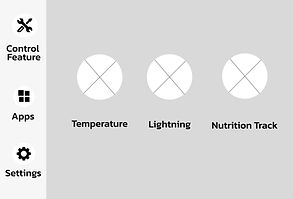
Initial layout defining modular access and navigation hierarchy.

Final interface applying brand color and visual emphasis to improve discoverability and active-state clarity
APPLICATION HUB
Centralized Feature Access
Home Electronics . Media

Initial layout organizing centralized access to home electronics and media modules.

Final interface applying brand color and visual emphasis to reinforce feature grouping and streamline navigation.
The modules are intentionally separated to emphasize interaction priority, reduce structural ambiguity, and support faster task recognition.
CONTROL FEATURE MODULES
Temperature. Lighting. Nutrition Track
TEMPERATURE CONTROL
Food Comfort & Precision Adjustment

Temperature interface for precise adjustment and quick confirmation, maintaining comfort during meals.
LIGHTING CONTROL
Ambient Environment Customization

Lighting interface enabling ambient customization while minimizing cognitive load during active dining.
NUTRITION TRACKING
Health awareness & Meal Insights

Nutrition interface offering structured meal insights and simplified tracking to support health awareness.
The system is organized into distinct modules to clarify interaction priorities and reduce cognitive load.
TEMPERATURE CONTROL
Food Comfort & Precision Adjustment

Mid-fidelity wireframe defining structural hierarchy and interaction zones prior to visual refinement.
Interaction State Evolution

Default Configuration
Heat Selected temperature zones with dual heat/cool controls.

Heat Activation State
Heat mode activates for centrally placed warm dishes, highlighting active zones and real-time control feedback.

Zone Adaptive State
Context-aware control state dynamically enables both heating and cooling zones to accommodate mixed food types (e.g., warm entrées and cold salads).
LIGHTING CONTROL
Ambient Environment Customization
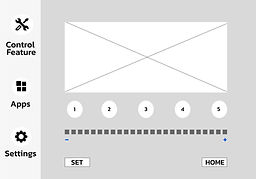
Mid-fidelity wireframe defining structural hierarchy and interaction zones prior to visual refinement.
Interaction State Evolution

Color Selection State
Preset LED color selection with real-time environmental feedback.

Intensity Adjustment State
Selected color state with adjustable brightness control for refined ambience tuning.
Structured input architecture enabling categorized meal logging and seat-specific tracking.
NUTRITION TRACKING
Health awareness & Meal Insights

Structured input architecture enabling categorized meal logging and seat-specific tracking.
Interaction State Evolution

Seat Selection
Users select their seat to enable personalized nutrition tracking and individual meal logging.

Mid-fidelity wireframe establishing food group categorization and progressive item selection hierarchy prior to visual refinement.

Food Group Selection State
Categorized food groups allow users to select meal types before progressing to detailed item selection.

Detailed Item Selection State
Expanded food database displaying specific items with nutritional codes used for final calorie and nutrient calculation.

Mode Selection
(Wireframe)
Mid-fidelity wireframe establishing user choice between automated scanning and manual nutritional input prior to visual refinement.

Mode Selection
(Refind)
Refined interface allowing users to choose between automated food scanning and manual nutritional data entry.

Manual Input Mode
(Wireframe)
Mid-fidelity wireframe establishing user choice between automated scanning and manual nutritional input prior to visual refinement.

Manual Input Mode
(Refined)
Refined interface allowing users to choose between automated food scanning and manual nutritional data entry.
APPLICATION HUB
Centralized Dining & Home Controls
The Application Hub centralizes system-level features, including home electronics and media control, within a unified interface.
HOME ELECTRONICS

Integrated Home Environment Controls
Provides centralized control of connected home systems — including climate, lighting, and blinds — directly from the smart dining interface.

Environmental Control
(Refined Interface)
High-fidelity interface unifying climate, lighting, and shading controls within the smart dining ecosystem.

Window Selection State
(Wireframe)
Mid-fidelity structural layout introducing zone-based window selection prior to shade adjustment.

Blind Adjustment State
(Final Interface)
High-fidelity interface enabling real-time adjustment of selected automated blinds within the smart dining ecosystem.

Climate Adjustment State
(Wireframe)
Mid-fidelity structural layout defining heating and cooling controls prior to visual refinement.

Climate Adjustment State
(Refined)
High-fidelity interface enabling real-time temperature regulation through integrated HVAC connectivity.

Lighting Zone Selection State
(Wireframe)
Mid-fidelity structural layout introducing room-based lighting selection and brightness control hierarchy.

Lighting Adjustment State
(Final Interface)
High-fidelity interface enabling real-time lighting intensity regulation and zone-based on/off control within the smart dining ecosystem.

Idle Timeout State
(Final Interface)
Automated inactivity timeout provides clear user feedback prior to system power-off, enhancing energy efficiency and interaction transparency.
System Integration Summary
Savant integrates dining interaction, environmental regulation, and system-level management into a unified touchscreen ecosystem, enhancing comfort, efficiency, and seamless everyday use.
SAVANT PROTOTYPE
A tablet-based dining interface designed for accessibility and ease. Features include large touch targets, high-contrast iconography, and minimal text—supporting intuitive use across ages and literacy levels. Built as a playful, inclusive foundation for future enhancements.
This early-stage interactive prototype features:
– Recognition-based iconography to reduce reliance on text
– Large touch targets exceeding accessibility size standards
– Subtle motion cues to support orientation and reduce cognitive load
– Text-light interface prioritizing visual clarity and operability
