
AI Health Navigator
A multilingual, accessible AI Health Navigator designed to make healthcare information easier to understand.
AI Health Navigator explores how AI can help multilingual users, older adults, and people with low health literacy better understand medications and information. The experience combines plain-language guidance, multilingual support, voice and image-based input, and accessibility features to reduce barriers to understanding health information.

Project Type
AI-Powered Mobile Application
Role
UX Researcher – UX/UI Designer
Skills Applied
-
User Interviews
-
Competitive Analysis
-
Information Architecture
-
User Flow
-
Wireframing
-
Prototyping
-
Usability Testing
Tools
– Figma
– Maze
– ChatGPT
– Claude
– Adobe Creative Suite
– AI Ideation Tools
My Responsibilities
-
Conducted qualitative user research
-
Synthesized qualitative research and used AI-assisted analysis to identify patterns
-
Designed user flows and information architecture
-
Created wireframes and high-fidelity prototypes
-
Designed accessibility features
-
Conducted usability testing and refined the interface based on user feedback
Timeline
8 weeks
PROBLEM STATEMENTS
Healthcare information can be difficult to understand, especially for multilingual users, older adults, and people with low health literacy and varying communication needs.
Three Key Pain Points
1. Complex Medical Language
Medication instructions, side effects, and lab results often use terminology that is difficult to understand.
2. Language Barriers
Users may switch between search engines, translation tools, and AI assistants to comprehend the same healthcare information.
3. Accessibility & Communication Gaps
Traditional healthcare tools often assume users will type questions and read responses. Research showed that users may need different combinations of communication methods based on their hearing, vision, literacy, language, and comfort with technology.
Voice
Text
Voice
Voice
Text
Voice
Speak the question, read the answer
Speak the question, hear the answer
Type the question, hear the answer
Supports hearing accessibility
Supports typing/reading difficulties
Supports vision or reading needs
These findings show that accessibility should not be treated as a single mode. Users need flexibility in how they communicate with AI based on their hearing, vision, language, literacy, and technology comfort. Together, these barriers can reduce confidence and make it harder for users to decide what to do next.
RESEARCH
1. Research Goal
I conducted qualitative interviews to understand how multilingual adults and older users search for healthcare information, what challenges they experience with medical terminology and translation, and how accessibility needs effect the way they interact with digital health tools.
GOAL: Identify where an AI assistant could provide useful guidance without replacing healthcare professionals.
2. Research Method
Language, medications, trust, accessibility, healthcare navigation
Qualitative Interviews
Focus
Participants
Method
4 Users
Manual review supported by Chat GPT
Analysis
3. Participants
-
Fluent in English
-
Health-literacy challenges
-
Wants image upload and audio explanation
Elin
Key Charactristics
Age
Participants
45
-
Speaks Armenian and Farsi
-
Sometimes understand English medical terms better
-
Prefers detailed explanations in Farsi
Aylin
53
-
English is her third language
-
Uses Google and translation tools
-
Prefers phone calls or doctor visits
Ida
76
-
Does not speak English
-
Limited experience with using technology
-
Prefers a voice-based assistant
Albert
71
4. Key Research Findings
Medical information was difficult to understand
Users struggled with medication terminology, lab results, and healthcare instructions.
Language increased search time
Participants moved between Google, translation tools, and AI assistants to understand information.
Users needed flexible communication
Some users preferred speking and reading the response, while others preferred voice interaction.
Users wanted guidance, not just information
Participants were often unsure what healthcare action to take next or which type of care was appropiate.
These findings directly informed plain-language explanations, multilingual support, image and voice input, flexible communication preferences, and guided healthcare navigation.
AI – Assisted Synthesis
Interview notes were organized and analyzed with ChatGPT to identify recurring themes, pain points, and design opportunities. I reviewed the AI–generated themes against the original participant responses and kept only findings supported by the resesrach.
AI accelerated synthesis, but final interpretation and design decisions remained human-led.
Design Opportunities
Based on the research findings, I translated recurring user needs into clear design opportunities that shaped the AI Health Navigator experience.
-
Plain-Language Explanations
Research need:
Medical terminology was difficult to understand.
Design Response:
Simplify medication information, lab results, and healthcare instructions using everyday language.
2. Multilingual Support
Research need:
Users moved between multiple tools to translate healthcare information.
Design Response:
Provide explanations in the user's preferred language with text and audio support.
3. Flexible Communication
Research need:
Users had different hearing, vision, typing, and technology needs.
Design Response:
Support multiple input and output combinations, including voice-to-text, voice-to-voice, and text-to-voice.
4. Image Based-Assistance
Research need:
Medication labels and medical information were sometimes difficult to describe or type.
Design Response:
Allow users to upload medication or healthcare images for AI-assisted recognition and explanation.
5. Guided Next Steps
Research need:
Users often wanted guidance, not just information.
Design Response:
Help users understand what to do next through follow-up questions, care guidance, and clear escalation to healthcare professionals.
These opportunities became the foundation for feature prioritization, information architecture, and the Medication Understanding Prototype.
PERSONAS
Primary Persona
Research-Based Persona

Aylin
53 years old
Multilingual Caregiver
I have to switch between Google, ChatGPT, pharmacies, and healthcare portals before I understand the answer.
Pain Points
-
Medical terminology is difficult.
-
Switches between Google, ChatGPT, pharmacies, and healthcare portals.
-
Doesn’t fully trust one source.
-
Healthcare navigation is time-consuming.
Needs
-
Plain-language explanations
-
Medication interaction guidance
-
Visual explanations and image support
-
Native-language support
-
Trusted medical references
Goals
-
Understand medications and lab results.
-
Make more confident healthcare decisions.
-
Receive trustworthy information in her preferred language.
-
Save time searching across multiple sources.
User Story

Design takeaway:
Reduce tool switching by combining plain-language explanations, multilingual support, and medication guidance in one experience.
Persona 2
Refined from user interviews

Ida
76 years old
Limited English Proficiency, Hearing Aid User
Would like healthcare information in my own language because it would change everything.
Pain Points
-
Medical language is confusing.
-
Small phone keyboards.
-
Hearing difficulties.
-
Uses Google Translate repeatedly.
-
Difficult deciding between urgent care, ER, and doctor.
Needs
-
Large text
-
Simple language
-
Native language translations
-
Easy navigation
-
Voice interaction
Goals
-
Understand doctor's instructions.
-
Read medication information.
-
Know where to seek care.
-
Feel confident managing medications.
User Story

Design takeaway:
Provide flexible communication options so users can read, listen, speak, or translate healthcare information based on their individual needs.
From Research to Product Decisions
Research Insight
Users struggled with medical terminology
Users switched between translation and healthcare tools
Users had different communication and accessibility needs
Users struggled to describe medical information
Users wanted guidance, not only information
Product Decison
Plain-language explanations
Multilingual support in one experience
Voice Text, Voice Voice, Text Voice
Image upload for medication labels and medical documents
Guided next steps + escalation to professional care
Design direction:
The research shifted the concept from a simple healthcare chatbot toward a multimodal navigation experience that adapts to users’ language, accessibility, and communication needs.
USER FLOW/ (Medication Understanding)
Goal:
Help users safely understand medications through AI-powered explanations, translation, voice support, and follow-up guidance.
Senario:
A user receives a medication they don’t understand and uses AI Health Navigator to identify it, understand key information, and decide what to do next.

Information Architecture
AI Health Navigator
Home
Preferences
Language
Accessibility
Symptoms
Medications
Lab Results
Find Care
Guide Me
Ask Questions
Recent Activity
WIREFRAME/ (Concept Exploration)
AI-Assisted Mid-Fidelity wireframes
After defining the information architecture and primary user flow, I used AI-assisted wireframing to rapidly explore interface layouts. I refined the concepts using research insights around plain language, multilingual support, multimodal input, and accessibility.
Screen 1-Medication Input
Design Goal: Allow users to ask about a medication using text, voice, or an image.

Screen 2-AI Explanation
Design Goal: Present medication information in plain language and support continued questions.

Screen 3-AI Medication Guidance
Design Goal: Help users continue the conversation with relevant next-step questions.

Feature Explored: Multimodal medication input using image upload, text, or voice.
Feature Explored: AI-supported medication recognition with plain-language explanations and conversational follow-up.
Feature Explored: Contextual follow-up questions that allow users to continue learning without restarting the conversation.
Wireframe Refinement
Based on user research and AI-assisted exploration, I refined the initial conversational interface into a more guided and accessible experience. Navigation became task-based, medication recognition became image-driven, and AI responses became more structured and easier to understand.
Screen 1
Accessible Home Screen
Design Goal: Introduce navigation, language selection, accessibility, and healthcare services.

Users customize their experience with language selection, accessibility
settings, and multiple interaction methods.
Screen 2
AI Medication Recognition
Design Goal: Allow users to identify medication using AI-powered image recognition.

The AI recognizes the uploaded medication image and presents personalized information options.
Screen 3
Personalized Healthcare Guidance
Design Goal: Present medication information in plain language with follow-up actions.

The AI delivers a simplified medication explanation and provides adaptive follow-up actions such as translation, audio support, and additional guidance.
AI Contribution
My Design Decisions
-
Shifted from open chat to task-based navigation
-
Added multilingual and multimodal interaction
-
Prioritized accessible controls and plain language
-
Added image-based medication recognition
-
Structured AI responses around user-selected needs
-
Generated early layout directions
-
Supported rapid interface exploration
-
Helped explore conversational patterns
These AI-assisted wireframes served as early exploration concepts. Each layout was refined using user research, accessibility principles, and iterative design decisions before evolving into the final high-fidelity prototype.
Accessible UI System
Color Palette
I explored AI-assisted color directions and refined the final palette based on accessibility, visual hierarchy, and healthcare communication needs.
Primary Brand Colors
Neutral Colors
Semantic Colors

Typography
Inter was selected for English content because of its readability, while Noto Sans supports multilingual text and improves accessibility for users reading non-Latin scripts.

Core UI Components
AI supported early component exploration, while I refined typography, spacing, color hierarchy, interaction patterns, and accessibility to create the final UI system.

Accessibility Principles
-
Large touch targets
-
Accessible color contrast
-
Voice interaction
-
Multilingual support
-
Plain-language labels
FINAL PROTOTYPE
The final prototype translates research findings into a guided, multilingual, and accessible healthcare experience. The design combines task-based navigation, AI-assisted medication recognition, multimodal interaction, and personalized follow-up guidance.
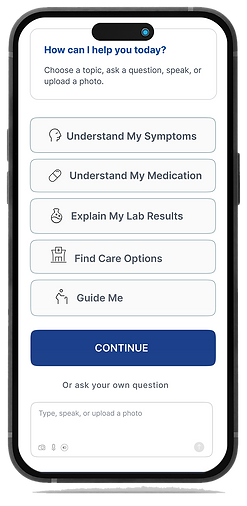
Accessible Home Experience
Task-Based Navigation
Clear healthcare actions reduce decision-making effort.
Accessible Interaction
Large touch targets and simple labels support easier navigation.
Multimodal Input
Users can ask questions through text, voice, or image upload.
Guided Medication Identification
Users can upload a photo of a medication, search by name, or continue without the medication name.
Language Preference

Accessibility Settings
Medication Understanding Workflow
The medication workflow guides users from AI-assisted identification to plain-language information and relevant next steps.
Medication Identified

Simple Explanation

Side Effects

Drug Interactions

Questions for Your Doctor

Research Insight
Design Decision
Research showed that some users may not know medication names or understand medical terminology. To reduce this barrier, the final workflow supports image-based identification, plain-language explanations, and guided follow-up options.
ACCESSIBILITY & PERSONALIZATION
Research revealed that users have different language, vision, hearing, and interaction needs. The final experience allows users to personalize how they receive and interact with health information.
ADAPTIVE COMMUNICATION PREFERENCES
Hearing Support
Hearing Preferences


Hearing Support: Users can personalize voice input, text responses, plain language, and live captions.
Vision Support
Vision Preferences


Vision Support: Users can enable voice responses, larger text, and higher contrast based on their needs.
MULTILINGUAL HEALTH INFORMATION
Users can select their preferred language and receive health information in a more understandable, plain-language format.
Choose Language
Translated Health Information

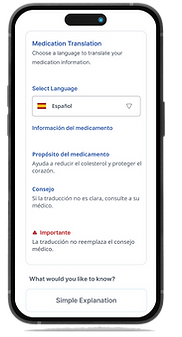
Users can select their preferred language and receive health information in a more understandable format.
Research Insight
Design Decision
Users may rely on translation, audio, or simplified language to understand health information.
Provide persistent language controls, audio support, and plain-language health information.
AI CONVERSATION & SAFETY
AI provides clear health information while maintaining boundaries around medical decisions.


Safety Boundary: The system provides educational guidance and directs users to healthcare professionals when medical decisions require professional care.
AI Interaction Principles
-
Plain-language information
-
Safety alert
-
Guided follow-up
Simplifies medical terminology
Highlights when professional care may be needed
Lets users continue without relying on an open-ended AI answer
INTERACTVE PROTOTYPE
Explore the interactive prototype to experience the medication-understanding workflow, accessibility features, and multilingual support.

Opens interactive prototype in Figma
USABILITY TESTING
Evaluating the Medication Understanding Workflow
I conducted usability testing with five users to evaluate whether they could complete the medication-understanding workflow, understand the AI-generated information, and use the communication and accessibility options.
5 Users | High-Fidelity Figma Prototype | Mediation Understanding Workflow
TESTING TASKS
-
Identify Medication
Choose a method to enter the medication: photo, voice, or text.
2. Understand Information
Scenario
Users were asked to imagine they had been prescribed a new medication and wanted to understand its purpose, possible side effects, and interactions.
Find the medication purpose and possible side effects.
3. Ask a Follow-Up Question
Continue through the guided medication experience.
4. Adjust Preferences
Change a communication preference, such as hearing or vision support.
My Role
I observed user behavior, documented usability issues, reviewed the findings, and made the final design decisions. AI tools helped organize feedback and identify patterns.
KEY FINDINGS DESIGN CHANGES
Usability testing identified several opportunities to improve language controls, accessibility, and communication preferences. These findings directly informed the final design refinements.
Primary Workflow Successfully Completed
Participants completed the medication-understanding workflow without assistance.
Separated app language from medication translation and made each option clearer.
Design Changes
Usability Finding
Microphone option was overlooked
Users wanted partial translation
Users wanted more audio control
Language setting caused confusion – several participants expected the entire app to translate.
Increased the visibility of the voice / microphone control.
Added translation controls for individual sections, rather than requiring the whole page to change language.
Added selective audio playback so users can choose what information to hear.
RESPONSIBLE AI PRINCIPLES
Responsible AI Principles
-
AI supports — not replaces — healthcare professionals.
-
Emergency situations direct users to professional care.
-
Plain-language explanations reduce misunderstanding.
-
User privacy and informed decision-making are prioritized.
REFLECTION & NEXT STEPS
What I Learned
AI can accelerate research synthesis, ideation, and iteration, but human judgment remains essential for evaluating user needs, accessibility, safety, and ethical decisions.
Design Takeaway
Designing for healthcare requires balancing accessibility, clarity, trust, and safety while supporting users with different languages and communication needs.
Next Steps
-
Validate medical explanations with healthcare professionals
-
Expand symptom and lab-result workflows
-
Improve AI confidence indicators
-
Test with larger multilingual populations
-
Add pharmacy and appointment integrations
-
Explore voice-recognition support across more languages